What the Pinterest Tag Sends, With Enhanced Match Hidden in a JSON Field
The Pinterest Tag sends its events to ct.pinterest.com/v3/ and /user/. Shops use it to count checkouts from Pinterest ads and to build audiences from site visitors, so it tends to sit on product, cart and confirmation pages.
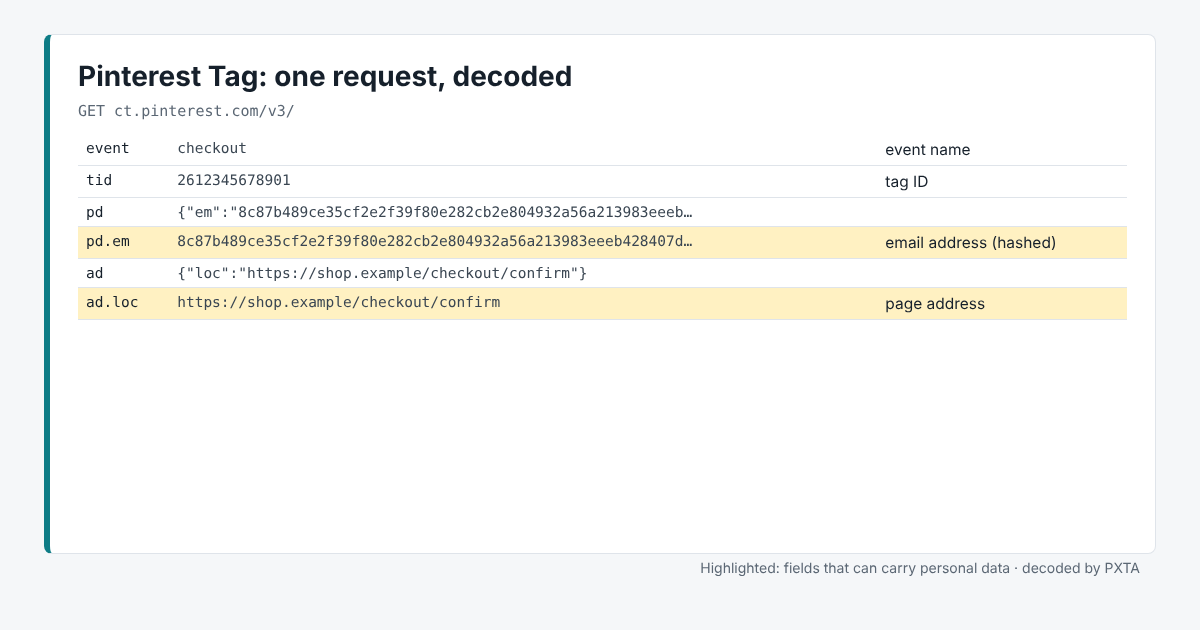
Its requests pack data in an awkward way. Some fields are JSON objects squeezed into a single URL parameter: the page details in ad, customer details in pd. Read raw, they’re a wall of percent signs. PXTA unpacks the JSON and shows each part as its own row.
The Fields That Matter
tidis the tag ID andeventthe event name, such aspagevisit,addtocartorcheckout.ad.locis the page address andad.refthe referring page, both inside theadJSON.pd.emis the hashed email from Pinterest’s enhanced match, inside thepdJSON.ed.fields carry event data such as order value and product IDs.
Where It Usually Goes Wrong
Enhanced match on the checkout page. Pinterest’s enhanced match sends a hashed email with events so Pinterest can link them to accounts. It can be set up by hand or turned on automatically. On a confirmation page it fires with the customer’s real address. PXTA finds the hash and says whose address it is when it saw that address on the site.
Confirmation pages with an email in the address. In the Harbor & Pine sample, the Pinterest Tag sent the plain email from the page address and its hash, before the banner was answered and after the visitor rejected.
One page only. Because the tag often sits only on checkout pages, a quick look at the home page misses it. Point PXTA at the confirmation page directly to be sure.
What PXTA Can’t See
Pinterest’s Conversions API takes events from a site’s server, outside the browser.