What the Google Ads Conversion Tag Sends, Including Enhanced Conversions
The Google Ads conversion tag tells Google that an ad click turned into a sale, a sign-up or a lead. It’s separate from Google Analytics, even when both are loaded by the same gtag.js script, and its requests go to different places: googleadservices.com/pagead/conversion/, googleads.g.doubleclick.net/pagead/viewthroughconversion/, and a few paths on www.google.com such as /pagead/1p-conversion/ and /ccm/collect.
PXTA knows all of those as one tracker, so a report lists “Google Ads conversion tag” once, whichever endpoint the site’s setup happens to use.
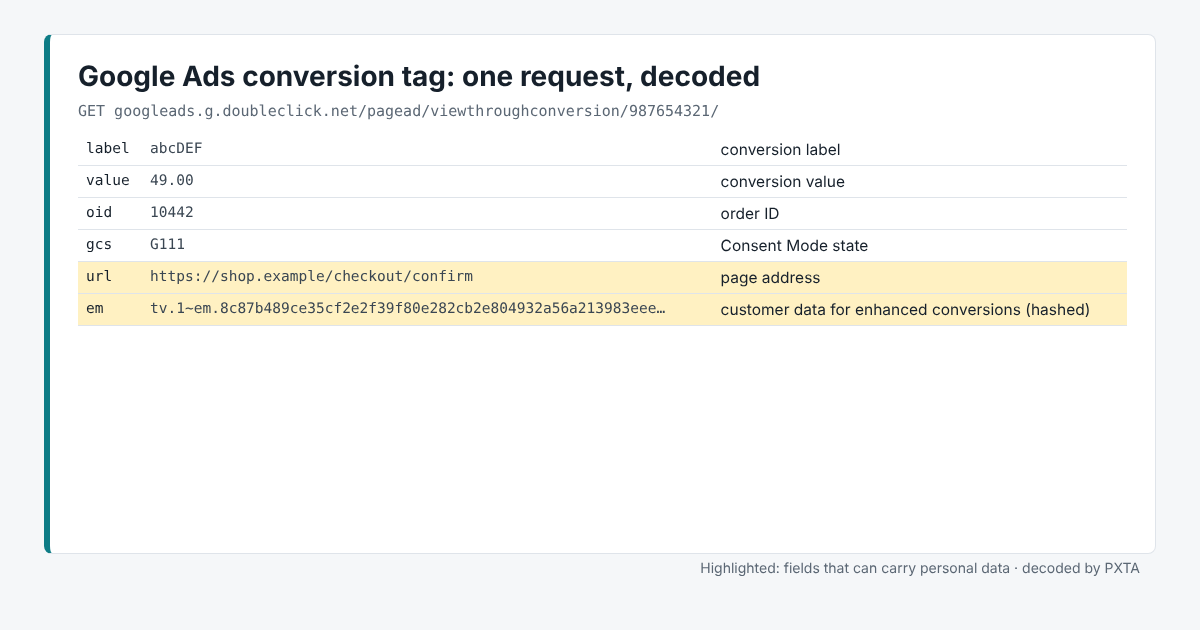
The Fields That Matter
labelis the conversion label, which says which conversion action this is.urlis the page address, andrefthe referring page.tibais the page title.valueandoidcarry the order value and the order ID.emcarries customer data for enhanced conversions, hashed.gcsandgcdcarry the Google Consent Mode state, the same as in Analytics.
Where It Usually Goes Wrong
Enhanced conversions. Google’s enhanced conversions hash the customer’s email, and sometimes phone and address, on the conversion page and send it along so Google can match the sale to a signed-in Google account. Like Meta’s advanced matching, it can be set to read the details from the page by itself. PXTA reports the hash with the address it came from, when it knows that address.
Conversion pages with details in the address. The conversion tag usually fires on the thank-you page, which is the page most likely to carry an order number or an email in its address.
Consent. The conversion tag supports Consent Mode, and whether it waits for an answer depends on how the site set it up. PXTA’s three passes show which it does.
What PXTA Can’t See
Google Ads also takes conversions uploaded from a site’s own systems, offline imports and server-side tagging. Those never pass through the browser.