Google Consent Mode gcs Values Explained, What G100, G110, G101 and G111 Mean in a Request
Google Consent Mode is how a cookie banner tells Google’s tags what the visitor agreed to. The site sets defaults when the page loads, usually “denied”, and updates them when the visitor answers. Google’s tags then add the current state to every request they send, in a short field called gcs.
Four characters, and most people never look at them. They’re worth reading, because they show what the tags were told at the moment each request left the browser.
Reading the Code
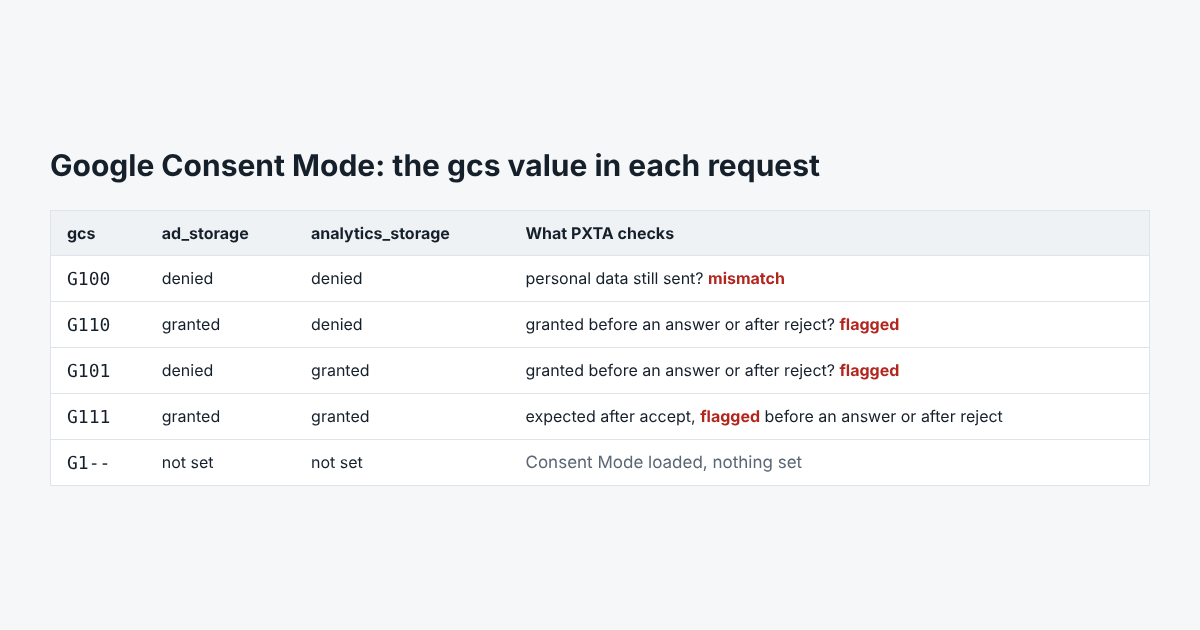
The value always starts with G1. The third character is ad_storage, the fourth analytics_storage. A 1 means granted, a 0 means denied, and a - means the site never set it.
So G100 is both denied, G111 is both granted, and G110 and G101 are the mixed cases. G1-- means Consent Mode is loaded but nothing was set.
There’s a second field, gcd, which encodes the defaults and updates in more detail. PXTA records it as evidence but builds its findings from gcs.
What “Denied” Still Allows
Consent Mode doesn’t stop Google’s tags from sending requests. In its advanced setup, the tags keep sending “cookieless pings” while consent is denied, and Google uses them for modelling. That part is by design.
The problem starts when the page hands the tag personal data anyway. A page address with an email in it goes out in dl whatever gcs says. PXTA reports that as consent-mode-mismatch: the request said denied and still carried personal data.
What PXTA Flags
- Granted before an answer or after a reject. If
gcsshows either storage as granted when the banner hasn’t been answered, or after PXTA clicked reject, PXTA raisesconsent-mode-granted. Before an answer it’s medium. After a reject it’s high, since the tag was told the opposite of what the visitor said. - Denied, with personal data.
consent-mode-mismatch, high before an answer or after a reject, low after accept. - Granted after accept. That’s the expected case and raises nothing.
The usual cause of a granted state after reject is a site that sets the defaults to granted and never updates them. The Marlow Home Loans sample shows exactly that: G111 on every page after the visitor said no.
Which Tags Use It
PXTA reads gcs from Google Analytics 4 and the Google Ads conversion tag. Other networks have their own consent signals, or none, which is why PXTA’s three passes look at what each tag actually sends rather than at what it says.