The First PXTA Release Is Out, a Free Command-Line Audit of What Tracking Pixels Send and When
The first PXTA release, version 0.1, is out. It’s a free, open-source command that loads a website in a real browser and writes down what every tracking pixel sends, where it goes, and whether the visitor had answered the cookie banner at the time.
You give it an address. It visits up to 20 pages, three times each if there’s a banner: once with the banner left alone, once after rejecting, once after accepting. Then it writes one HTML report, a JSON file of the findings and the raw capture as a HAR file.
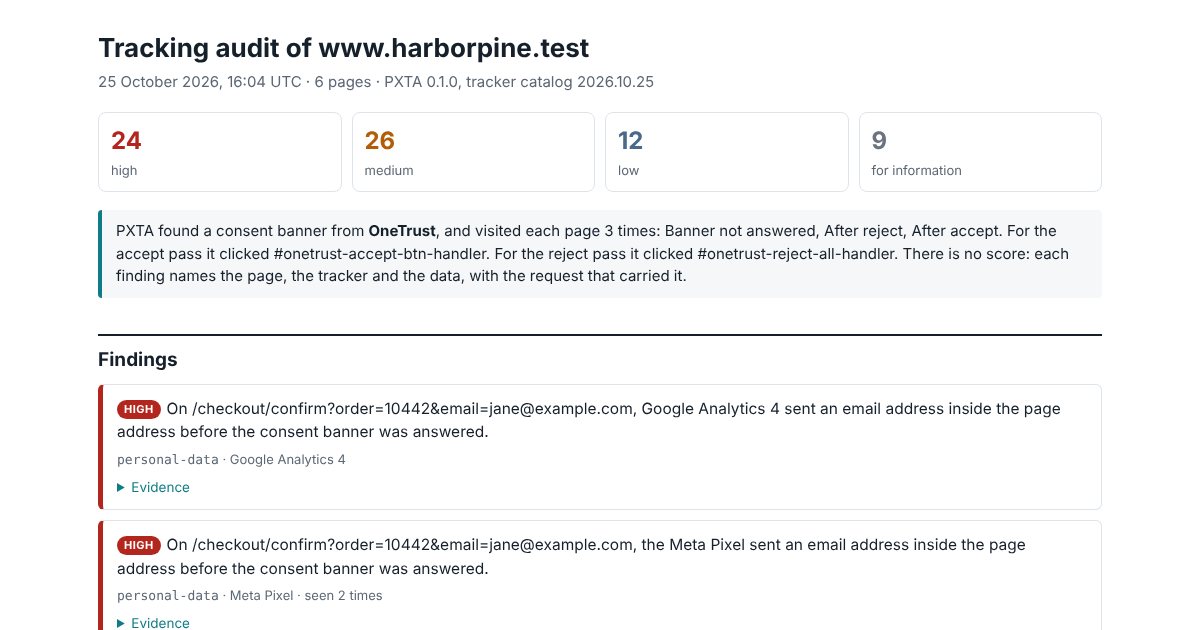
What It Finds
The report doesn’t give a score. Each finding is a sentence: On /checkout/confirm, the Meta Pixel sent a SHA-256 hash of the email address jane@example.com before the consent banner was answered. Under it is the request that carried the data, every field decoded, the field that matters highlighted, and a command to reproduce it.
Version 0.1 knows ten trackers, including the Meta Pixel, Google Analytics 4, Google Ads, TikTok, LinkedIn, Microsoft UET, Pinterest, Snap and X. It also lists third-party requests it doesn’t recognise when they look like beacons or carry personal data. It finds email addresses in any of the usual encodings, hashes of addresses it knows, search terms, page addresses about health or money trouble, and Google Consent Mode values that disagree with the visitor’s answer.
It answers OneTrust, Cookiebot, Didomi and Usercentrics banners by their own buttons or JavaScript, and other banners by the words on their buttons, in iframes and shadow roots too.
Try It on the Samples First
The sample reports are four made-up businesses from PXTA’s tests: a shop that leaks a customer’s email, a clinic whose ad pixels ignore the banner, a lender whose reject button loads the tags anyway, and a bakery that gets it right. Each one has a short write-up of what went wrong and how to fix it.
Get It
Downloads for Linux, macOS and Windows are on the download page. PXTA uses the Chrome, Chromium or Edge already installed. The source is on GitHub under the Apache License 2.0, and the reference lists every rule and option.
It runs on your machine and sends nothing anywhere. Version 0.1 has no build check and no way to compare two audits yet; both are known gaps listed in the repository.